
A clear sales pipeline
Track opportunities by stage, review deal values and see which deals need attention.

 Odoo CRM
Keep leads, opportunities and follow-up activities together. Give your team a clear view of each deal and its next step.
Discuss your requirements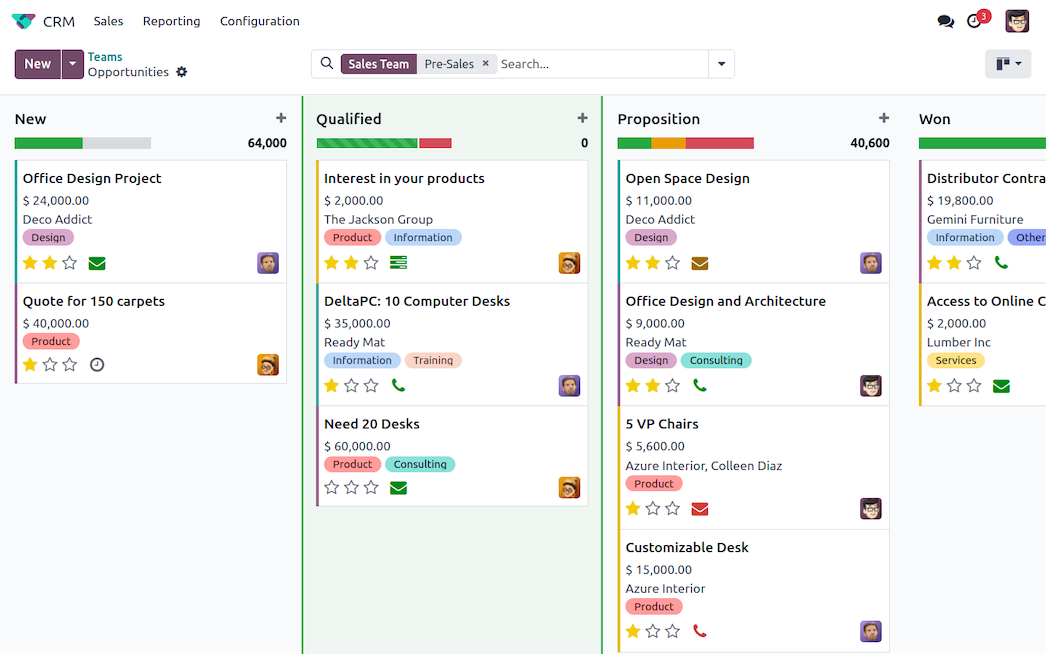
Track opportunities by stage, review deal values and see which deals need attention.
Schedule the next activity and keep communication with each opportunity.
Create a quotation from an opportunity with the Sales app and keep the deal history together.
Turn website enquiries and messages sent to a configured sales alias into CRM records. Assign an owner and record what the customer needs before moving the deal forward.
Schedule a call, meeting or follow-up on the opportunity. In pipeline reviews, check which deals have overdue activities or no next action.
With Odoo Sales installed, create a quotation from the opportunity. A confirmed quotation becomes a sales order. Record a lost reason when the customer declines so the team can review patterns.
Keep expected revenue and closing dates current. Compare pipeline value by stage, team or source and use won and lost deals to review where opportunities stall.
Start with a sample of contacts and open deals. Map owners, stages and fields, clean duplicates and check the import before moving the remaining records.
We can configure stages, roles and lead routing with your team, then test a representative enquiry through qualification, quotation and order confirmation before go-live.
We map your processes, configure the right modules and connect the systems you already use. Migration, training and ongoing support are planned around your team.
Available features depend on your Odoo version, edition and configuration. The videos illustrate workflows and may show a different interface.
YOUR NEXT STEP